mandag den 27. juni 2011

LINQ and GridView

I normally don’t use GridView a lot. but once in a while its nice to be able to fast show some data. if you assign the data source on a GridView a LINQ query it seems to work.

But if you add conditions to the query you will properly see the below error

The LINQ expression node type 'Invoke' is not supported in LINQ to Entities.

Well, Google and you’ll find a few solutions, the one I preferred where using linked and the apply AsExpandable. That solved one issue, but then you will get

The data source does not support server-side data paging

lastly, once this is done, you might get an error when doing the actually paging

The GridView 'GridView1' fired event PageIndexChanging which wasn't handled.

One way to handle this is to convert the result to a data table. a comment on this blog gave a simple way of doing that. So here is a short example of it all

Protected Sub Page_Load(sender As Object, e As System.EventArgs) Handles Me.Load
    Dim predicate = PredicateBuilder.False(Of ModelprovExchangeQueues.FseQuarantine)()
    For Each email In CurrentUser.emails
        Dim emailAddress As String = email.Email
        predicate = predicate.Or(Function(x) x.RecipientAddresses.Contains(emailAddress))
    Next
    Dim query = _db.FseQuarantine.AsExpandable().Where(predicate)
    Dim dt As Data.DataTable = query.ToDataTable

    GridView1.AllowPaging = True
    GridView1.DataSource = dt
End Sub

Protected Sub GridView1_PageIndexChanging(sender As Object, e As System.Web.UI.WebControls.GridViewPageEventArgs) Handles GridView1.PageIndexChanging
    GridView1.PageIndex = e.NewPageIndex
    GridView1.DataBind()
End Sub

fredag den 27. maj 2011

Access is denied. (Exception from HRESULT: 0x80070005 (E_ACCESSDENIED))

So when playing with SharePoint 2010 using claims based authentication of cource sometimes I would see the above error. It really didn’t make much sense. I was doing everything as administrator and I could do the same thing from the administration website, but not powershell.

for instance

$snapin = Get-PSSnapin | where {$_.name -eq 'Microsoft.SharePoint.PowerShell'}
if($snapin -eq $null){ Add-PSSnapin Microsoft.SharePoint.PowerShell }
$webappurl = 'someweb.domain.com'
$spsite = get-spsite "https://$webappurl"
$spweb = get-SPWeb -site $spsite
Get-SPWeb : Access is denied. (Exception from HRESULT: 0x80070005 (E_ACCESSDENIED))
At line:1 char:19
+ $spweb = get-SPWeb <<<<  -site $spsite
    + CategoryInfo          : InvalidData: (Microsoft.Share....SPCmdletGetWeb:SPCmdletGetWeb) [Get-SPWeb], Unauthorize   dAccessException
    + FullyQualifiedErrorId : Microsoft.SharePoint.PowerShell.SPCmdletGetWeb

Well, not sure if this is a “prober” solution, but this worked for me.
Open Central Administration –> Security –> Configure managed accounts
Make sure the user that gets above error is registered.

Open Central Administration –> Security –> Configure service accounts
Select Farm Account –> Select the account from the dropdown menu and click OK

Scripting ADFS 2.0 to make Sharepont 2010 relying party trust

I really wanted to use Set-ADFSRelyingPartyTrust –IssuanceTransformRules but for some weird reason no matter how I setup the paramteres I would just “screw” up the Claim Rules when watching the GUI so ended up using a ClaimRuleFile instead.

$snapin = Get-PSSnapin | where {$_.name -eq 'Microsoft.Adfs.PowerShell'}
if($snapin -eq $null){ Add-PSSnapin Microsoft.Adfs.PowerShell }

$Identifier = @(("https://" + $webappurl +"/_trust/"),('urn:sharepoint:' + $webappurl))
$rpt = Get-ADFSRelyingPartyTrust $webappurl
if(!$rpt) { $rpt = Add-ADFSRelyingPartyTrust -Identifier $Identifier -name $webappurl -EncryptionCertificateRevocationCheck None }
# Set-ADFSRelyingPartyTrust -TargetName $webappurl -EncryptionCertificateRevocationCheck None
Set-ADFSRelyingPartyTrust -TargetName $webappurl -Identifier $Identifier

$IssuanceAuthorizationRules = '@RuleTemplate = "AllowAllAuthzRule" => issue(Type = "http://schemas.microsoft.com/authorization/claims/permit", Value = "true");'
Set
-ADFSRelyingPartyTrust -TargetName $webappurl -IssuanceAuthorizationRules $IssuanceAuthorizationRules

$rSet = New-ADFSClaimRuleSet -ClaimRuleFile 'X:\SPS_2010_prov\IssuanceTransformRules.txt'
Set
-ADFSRelyingPartyTrust -TargetName $webappurl -IssuanceTransformRules $rSet.ClaimRulesString
# $IssuanceTransformRules = '@RuleTemplate = "LdapClaims" @RuleName = "Pass-through LDAP Claims" c:[Type == "http://schemas.microsoft.com/ws/2008/06/identity/claims/windowsaccountname", Issuer == "AD AUTHORITY"] => issue(store = "Active Directory", types = ("http://schemas.microsoft.com/ws/2008/06/identity/claims/windowsaccountname", "http://schemas.xmlsoap.org/ws/2005/05/identity/claims/emailaddress", "http://schemas.microsoft.com/ws/2008/06/identity/claims/role"), query = ";sAMAccountName,mail,tokenGroups;{0}", param = c.Value);'
#
Set-ADFSRelyingPartyTrust -TargetName $webappurl -IssuanceTransformRules $IssuanceTransformRules

#$samlEndpoint = New-ADFSSamlEndpoint -Protocol 'SAMLAssertionConsumer' -Uri ('https://' + $webappurl + '/_trust/') -Binding 'POST' -IsDefault $true -Index 0
#
Set-ADFSRelyingPartyTrust -TargetName $webappurl -SamlEndpoint $samlEndpoint

Set
-ADFSRelyingPartyTrust -TargetName $webappurl -WSFedEndpoint "https://$webappurl/_trust/"

#Set-ADFSRelyingPartyTrust -TargetName $webappurl -TokenLifetime 5


And heres the content on IssuanceTransformRules.txt (note its just a plain copy’n’paste from (Get-ADFSRelyingPartyTrust $webappurl).IssuanceTransformRules )


@RuleTemplate = "LdapClaims"
@RuleName = "Send LDAP Claims"
c:[Type
== "http://schemas.microsoft.com/ws/2008/06/identity/claims/windowsaccountname", Issuer == "AD AUTHORITY"] => issue(store = "Active Directory", types = ("http://schemas.microsoft.com/ws/2008/06/identity/claims/windowsaccountname", "http://schemas.xmlsoap.org/ws/2005/05/identity/claims/emailaddress", "http://schemas.microsoft.com/ws/2008/06/identity/claims/role"), query = ";sAMAccountName,userPrincipalName,tokenGroups;{0}", param = c.Value);

tirsdag den 17. maj 2011

Remote Desktop RDWeb remoteapp icons reverting to RDP default icon

I’ve had that problem a few times, but I finally found a work around that works every time.

go to C:\Windows\Web\RDWeb\Pages\rdp on the Remote Desktop Web servers and make sure the TS Web Access Computers have access to this folder. Delete all the content and refresh the webpage.

lørdag den 14. maj 2011

Anyone that can explain this ?

It happened again. I have a web project, and added a service reference to a WCF service. I have a few settings I needed loaded on every page, so decided to create a new class and inherit from the WCF Client

image

it compiles fin, but the IDE keeps showing a ton of errors on all the pages that uses this new class. One of the more fun is the below one

image

Bah, if it works why the hell is the IDE showing tons of errors and weird errors. If anyone out there have an idea/workaround that would be nice.

lørdag den 7. maj 2011

ADFS 2.0 and ASP.NET

I want to learn more about ADFS, and possibly use it my self in a few projects, so I set my self the goal to create a simple webpage that implemented SSO through Windows Identity Foundation and using my existing ADFS 2.0 server. I wanted a website that supports anonymous users, and sign on using both Kerberos and Forms based authentication.

Man has that been more reading than testing, but I think I’m starting to get the basic concepts. One of the first things that had me confused was that I had just seen in CRM 2011 to control how ADFS decides to authenticate you was based on URL’s and or FQDN’s. Well, it doesn’t. Yes you can modify FormsSignIn.aspx and IdpInitiatedSignOn.aspx. You can also force a specific way by editing the list of handlers in web.Config on the ADFS server. But that would just break my CRM2011 installation and just felt wrong.

Turns out, ADFS doesn’t decide, YOU decided by setting the authenticationType in the URL used to redirect the user to the ADFS server. Gah, I’m getting away from the point of this blog post. I wanted to give my self and others a quick how to, on how to quickly implement a webpage that supports all the above.

1) install ADFS.

2) on your developer machine, install Windows Identity Foundation SDK. I’m working in .NET 4.0 so just download that and install it. After installation, if you are a VB coder like me you will get disappointed to see you cant find the “Claims based aware website” template. Ah well, screw them we don’t need help, do we ? Open-mouthed smile …Create a new empty website. To save your self *A LOT* of trouble, make it use SSL.

image

image

If you decide to add it later, or just make sure the application in the IIS has force SSL enabled. You can remove it again in a minute don’t worry.

image

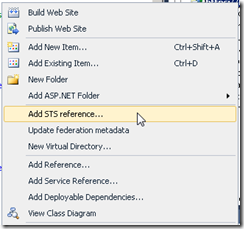
Now, right click your website in visual studio and choose “Add STS reference…”
image

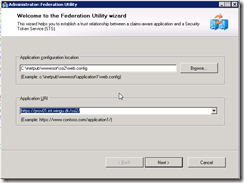
Application URI is what people will type in there browser to access your website. Now, you can either run this guide multiple times for each FQDN, or just edit it later in web.config and “Update federation metadata”. Just to be safe I ran the guide twice. Once for the internal URL and once for the external URL. ( the screenshots here is from an test app I call SSI2 )
image

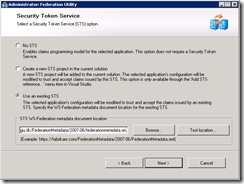
Press next and choose “Use existing STS”, type the URL to your STS ( ADFS 2.0 server. this could ofc also just be the build in STS server in windows 2008 R2 –> Server manager –> Roles –> Add Roles –> “Active Directory Federation Service” … )
In my case the STS is at https://adfs.wingu.dk/FederationMetadata/2007-06/federationmetadata.xml
image

If you don’t have an STS, you can also choose “Create a new STS project” but …
First of all. It is C# and who wants to look at ugly code with an semicolon in the end of every sentence ? and secondly.
You will miss out on all the wonderful trouble shooting and the “WAOUW” feeling when it finally works. With the STS sample you just type a name in the login screen and everything works. Where is the fun in that ?

Next decided if you want the wsFederation to validate certificates. of course you do. *cough*

image

Next choose a certificate used to encrypt tokens send back and forth from the STS and your Web app. You can skip this, but I really don’t recommend it.

image

Accept the confirmation page that also list all the claims you can get from the STS. Don’t worry they will all be in your web.config ready to be “un remarked” for your pleasure.

image

First thing you want to do is update your STS with the new project you just created. Notice the guided added an XML file, you can use to link your STS to your webapp with.

image

Go on, jump to your ADFS and add the URL. Open AD FS 2.0 console and add your Relying Party Trust

image

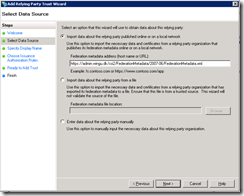
Choose Import data about the relying party published online or on local network and past in the URL to your application. ( in my case it’s https://admin.wingu.dk/ssi2/FederationMetadata/2007-06/FederationMetadata.xml )
image

Choose default setting the rest of the guide and jump back to Visual Studio.
Open your web.config and go to
configuration->system.web->authorization and remark out the deny rule

<authorization>
  <!-- <deny users="?"/> -->
</authorization>

Hell, while you are there disable errors too, you will see one soon. I promise.

<system.web>
  <customErrors mode="Off"/>
  <authorization>
    <!-- <deny users="?"/> -->
  </authorization>

If you go down to configuration –> microsoft.identityModel –> service-> applicationService –> audienceUris you will see the URL’s you added above.

<audienceUris>
  <add value="https://admin.wingu.dk/ssi2/"/>
  <add value="https://prov01.int.wingu.dk/ssi2/"/>
</audienceUris>

You can edit this at anytime and update it by right clicking your project and choose “Update federation metadata”.
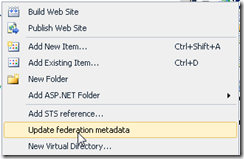
image

Remember you need to refresh this on the ADFS server too

image

Add 2 Web Forms. Default.aspx and login.aspx. On default.aspx drag in a FederatedPassiveSignInStatus and then double click it. Add the following code

Protected Sub FederatedPassiveSignInStatus1_SigningOut(sender As Object, e As System.ComponentModel.CancelEventArgs) Handles FederatedPassiveSignInStatus1.SigningOut
    Dim authModule As WSFederationAuthenticationModule = FederatedAuthentication.WSFederationAuthenticationModule
    Dim signoutUrl As String = WSFederationAuthenticationModule.GetFederationPassiveSignOutUrl(authModule.Issuer, authModule.Realm, Nothing)
    WSFederationAuthenticationModule.FederatedSignOut(New Uri(authModule.Issuer), New Uri(authModule.Realm + "Default.aspx"))
End Sub

This code will trigger when the user is logged in, and clicks the “logout” link. If user isn't logged in, and he clicks the “sign in” link, the user gets redirect to login.aspx.

So go to that and add the following code to handle logins.

Protected Sub Page_Load(sender As Object, e As System.EventArgs) Handles Me.Load
    Dim authModule As WSFederationAuthenticationModule = FederatedAuthentication.WSFederationAuthenticationModule
    authModule.PassiveRedirectEnabled = True
    'Dim mess As WSFederationAuthenticationModule.SignInRequestMessage = authModule.CreateSignInRequest("passive", returnUrl, False)
    Select Case Request.Url.Host.ToLower
        'Case "localhost", "prov01", "prov01.int.wingu.dk"
        '    Dim returnUrl As String = "https://prov01.int.wingu.dk/ssi2/"
        '    Dim mess As WSFederation.SignInRequestMessage = authModule.CreateSignInRequest("passive", returnUrl, False)
        '    mess.Realm = "https://prov01.int.wingu.dk/ssi2/"
        '    Dim redirURL As String = mess.WriteQueryString()
        '    Response.Redirect(redirURL)
        Case "localhost", "prov01", "prov01.int.wingu.dk"
            Dim returnUrl As String = "https://admin.wingu.dk/ssi2/"
            Dim mess As WSFederation.SignInRequestMessage = authModule.CreateSignInRequest("passive", returnUrl, False)
            mess.AuthenticationType = "urn:federation:authentication:windows"
            mess.Realm = "https://admin.wingu.dk/ssi2/"
            Dim redirURL As String = mess.WriteQueryString()
            Response.Redirect(redirURL)
        Case Else
            Dim returnUrl As String = "https://admin.wingu.dk/ssi2/"
            Dim mess As WSFederation.SignInRequestMessage = authModule.CreateSignInRequest("passive", returnUrl, False)
            mess.AuthenticationType = "urn:oasis:names:tc:SAML:2.0:ac:classes:Password"
            mess.Realm = "https://admin.wingu.dk/ssi2/"
            Dim redirURL As String = mess.WriteQueryString()
            Response.Redirect(redirURL)
    End Select

    'HttpContext.Response.Redirect(mess.WriteQueryString())

End Sub

Yeah, I suck. I haven't solved all the problems yet,I will update this post once I get it working the way I want. But I’m still sure others searching on ADFS might find a bit of this useful. Basically I want to update “AuthenticationType” so that users internally don’t get prompted at all, and just fly’s in via Kerberos and people externally gets ADFS’s forms based login page. Since ADFS has both the internal URL and external URL I would expect the code I remarked out to work, but I keep getting

ID3206: A SignInResponse message may only redirect within the current web application: 'https://prov01.int.wingu.dk/ssi2/' is not allowed.

so instead I force all users to be redirected to the external page. It works, sure but if the user logs out he cant login again using Kerberos ( he's now coming from the external domain ) so he either have to update the URL in the browser or login using forms based authentication. If I find out why I get that error ill update the post. For now this almost solved the goals I set for my self

A potentially dangerous Request.Form value was detected from the client (wresult="<t:RequestSecurityTo...").

as follow up to last post. Once you drop your first class into App_Code you will encounter an error stating you cant have both VB and C# code in same directory. Fine, I never did like semicolon anyway, so I deleted WIFSampleRequestValidator.cs and removed

<httpRuntime requestValidationType="SampleRequestValidator"/>

from the system.web part of web.config. First time I try logging in I instantly get

A potentially dangerous Request.Form value was detected from the client (wresult="<t:RequestSecurityTo...").

oh, so TTHAAATTSS what the ugly C# code did. Ah well, I added the above statement in web.config and added a new SampleRequestValidator class.

Imports System.Web.Util
Imports Microsoft.IdentityModel.Protocols.WSFederation

Public Class SampleRequestValidator
    Inherits RequestValidator

    Public Sub New()
    End Sub

    Protected Overloads Overrides Function IsValidRequestString(ByVal context As HttpContext, ByVal value As String, _
            ByVal ValidationSource As RequestValidationSource, _
            ByVal collectionKey As String, _
            ByRef validationFailureIndex As Integer) As Boolean
        Try
            validationFailureIndex = -1 ' Set a default value for the out parameter.

            ' This application does not use RawUrl directly so you can ignore the check.
            If ValidationSource = RequestValidationSource.RawUrl Then
                Return True
            End If

            If (ValidationSource = RequestValidationSource.Form) AndAlso _
                collectionKey.Equals(WSFederationConstants.Parameters.Result, StringComparison.Ordinal) Then

                Dim message As SignInResponseMessage = WSFederationMessage.CreateFromFormPost(context.Request)
                If message IsNot Nothing Then Return True
                Return MyBase.IsValidRequestString(context, value, ValidationSource, collectionKey, validationFailureIndex)
            Else
                ' All other HTTP input checks are left to the base ASP.NET implementation.
                Return MyBase.IsValidRequestString(context, value, ValidationSource, collectionKey, validationFailureIndex)
            End If
        Catch ex As Exception
            Return MyBase.IsValidRequestString(context, value, ValidationSource, collectionKey, validationFailureIndex)
        End Try
    End Function
End Class
Jesus, Microsoft really abandoned their visual basic fans in favor of the semicolon loving people, eh ?